
Change booking
- Home
- Change booking
Attention
This operation can only be performed if the ticket was purchased on our website; otherwise, we invite you to contact the agency or portal where the booking was completed directly. Thank you!
How to manage your booking
To change or cancel your booking independently and with a few simple steps, you will have to enter the data on the PDF of the online ticket that you received by e-mail on the day of purchase following the guidelines found in the image below. Once you have entered the required data and codes you will have to click on "edit"
or "delete, be careful with the "cancel" option the cancellation process will start with penalty, the cancellation process is irreversible.
At the change of time, date and route, management costs will be charged, which can be consulted during the change phase.
At the change of time, date and route, management costs will be charged, which can be consulted during the change phase.
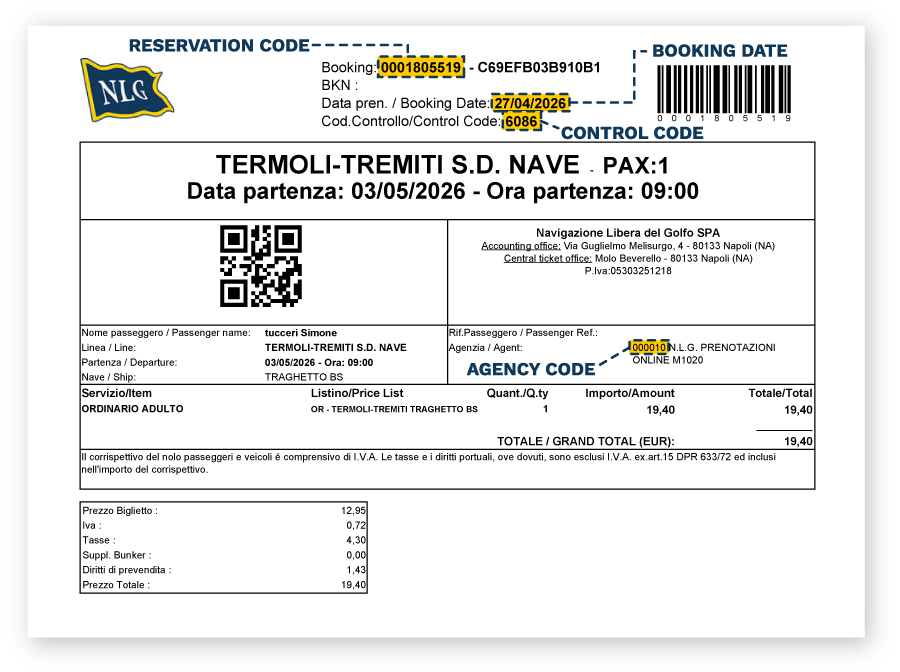
To change your booking:
REMEMBER TO HAVE WITH YOU:
AGENCY CODE
BOOKING NUMBER
VERIFICATION CODE
PURCHASE DATE
You will find this information on the PDF email ticket you received during your purchase.
If you encounter difficulties completing the online procedure, you may contact our Customer Service team at customercare@nlg.it.
Travel agencies may use the dedicated email address rimborsi@nlg.it.